
GoDAM Analytics tells you whether people watch your videos, how far they get, what they do with your interactive layers, and, if you sell, what your videos earn. It works across every video and image you publish with GoDAM, right inside your WordPress dashboard. No tags to place, no separate tool to open.
What GoDAM Analytics tells you
In one place, GoDAM answers the questions that matter for video:
- Are people watching? Plays, unique viewers, and where in the world they are.
- Are they staying? Play rate, watch time, and how far through a video they get.
- Are they acting? Clicks, form submissions, poll votes, and add-to-carts on your interactive layers.
- Is it selling? For WooCommerce stores, the cart activity and revenue your videos drove.
What you’ll need
- You’re on GoDAM 2.1 or later, installed and connected to your account (a valid API key under GoDAM → Settings).
- At least one video that has been played, so the numbers have something to show.
- For revenue and shopping metrics, the GoDAM for Woo add-on with WooCommerce. Everything else works without it.
Where your analytics live
- The whole account: GoDAM → Dashboard in the WordPress admin. Every video and image, added together.
- One video on its own: GoDAM → Media Editor, open a video, then Analytics (or use the video’s Single Video Analytics link).
- Videos delivered through the cloud: the GoDAM Central dashboard at app.godam.io, covered in GoDAM Central Analytics.
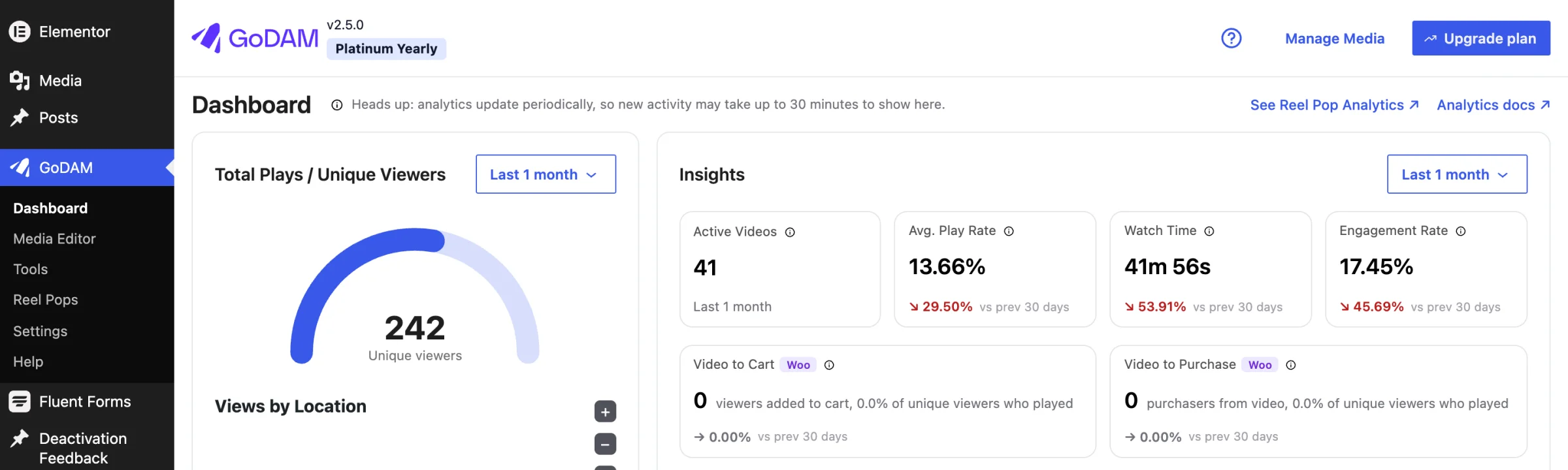
Heads up: analytics update on a schedule, not the instant something happens. Brand-new activity can take up to about 30 minutes to appear.
How analytics is organized
Four views, each answering a different question. Start with whichever fits what you want to know.
- Analytics Dashboard is the big picture across every video: plays, unique viewers, watch time, play rate, the playback trend over time, your top videos, and where your viewers are.
- Single-video analytics zooms into one video: how it is watched, its interactive layer timeline, and which pages it performs on.
- Revenue Analytics is the shopping your videos drove, for WooCommerce stores only: video-attributed revenue, the Direct / Assisted / Influenced split, the purchase funnels, and top products.
- GoDAM Central Analytics is the view for videos embedded through GoDAM Central (app.godam.io), where playback and viewer data are reported from the cloud.
Terms you’ll see everywhere
These few terms carry across every analytics screen, so it’s worth knowing them once.
| Term | What it means |
|---|---|
| A “play” | The viewer actually started the video, not just had it load on the page. Every rate (play rate, engagement, video to cart) is measured against real plays. |
| Unique viewers | Distinct people. Repeat plays by the same person don’t inflate your reach. |
| Play rate | Of the people who loaded a video, how many actually pressed play. |
| Watch time & engagement | Total time watched, and how far through a video people get on average. |
| The time filter | Each card has its own range control (All Time, Last 7 days, a custom range). Change one and only that card re-scopes. |
| Refresh | Numbers update on a schedule, so very recent activity may not appear right away (up to about 30 minutes). |
Where to start
- Open GoDAM → Dashboard for the account-wide picture.
- Read the Playback trend and Top Videos to see what’s working and what isn’t.
- Click into a single video to see its layer timeline and the pages it appears on.
- If you run a store, open Revenue Analytics to see what your videos sold.
Good to know
- Media Analytics (plays, watch time, engagement, layer interactions) is the base every GoDAM user gets. Revenue Analytics only appears when the GoDAM for Woo add-on is active.
- Analytics covers video and commerce interactions.
- Every number respects the range control on its own card, so two cards can show different windows at the same time. Check the range if a figure looks higher or lower than you expect.
Have questions? Reach out to our support team, and we’ll be happy to help.