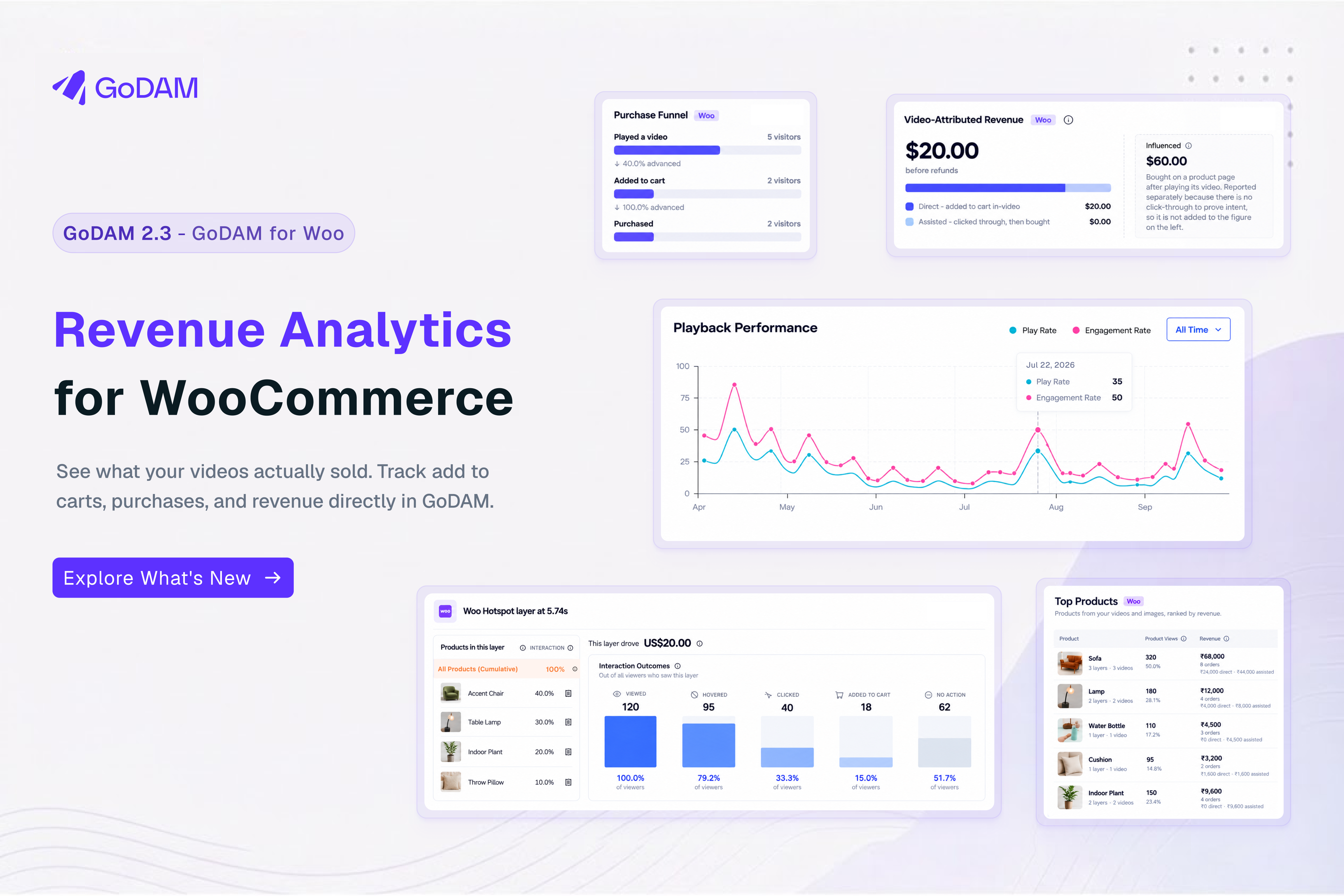
GoDAM 2.3 closes a gap in WooCommerce video analytics: you could see an add-to-cart from a video, but not the order value credited to it. With GoDAM for Woo 2.2, your WordPress dashboard shows that value, the products shoppers opened from your videos, and the steps from play to purchase.
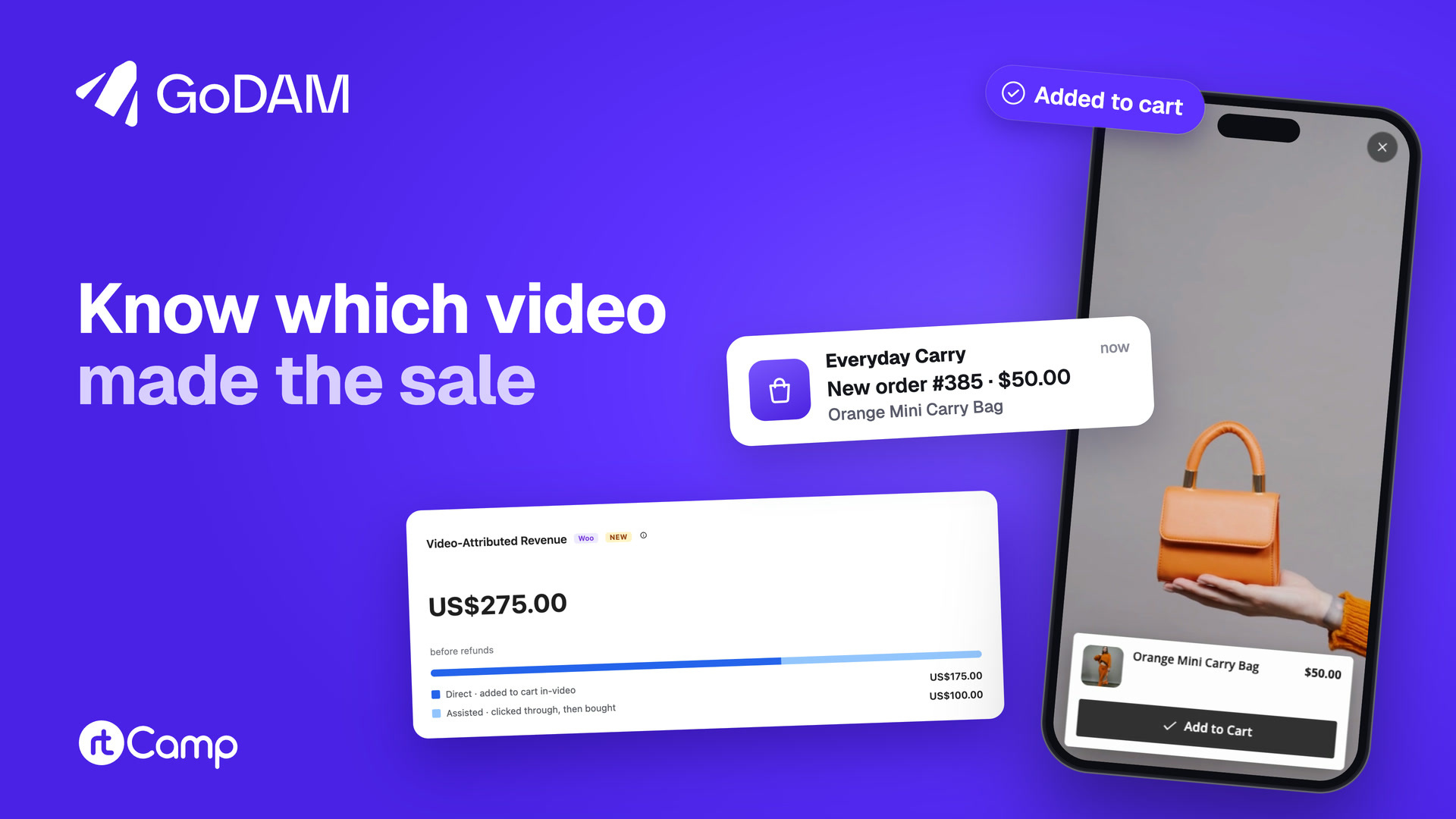
Open a video to see the order value credited to it
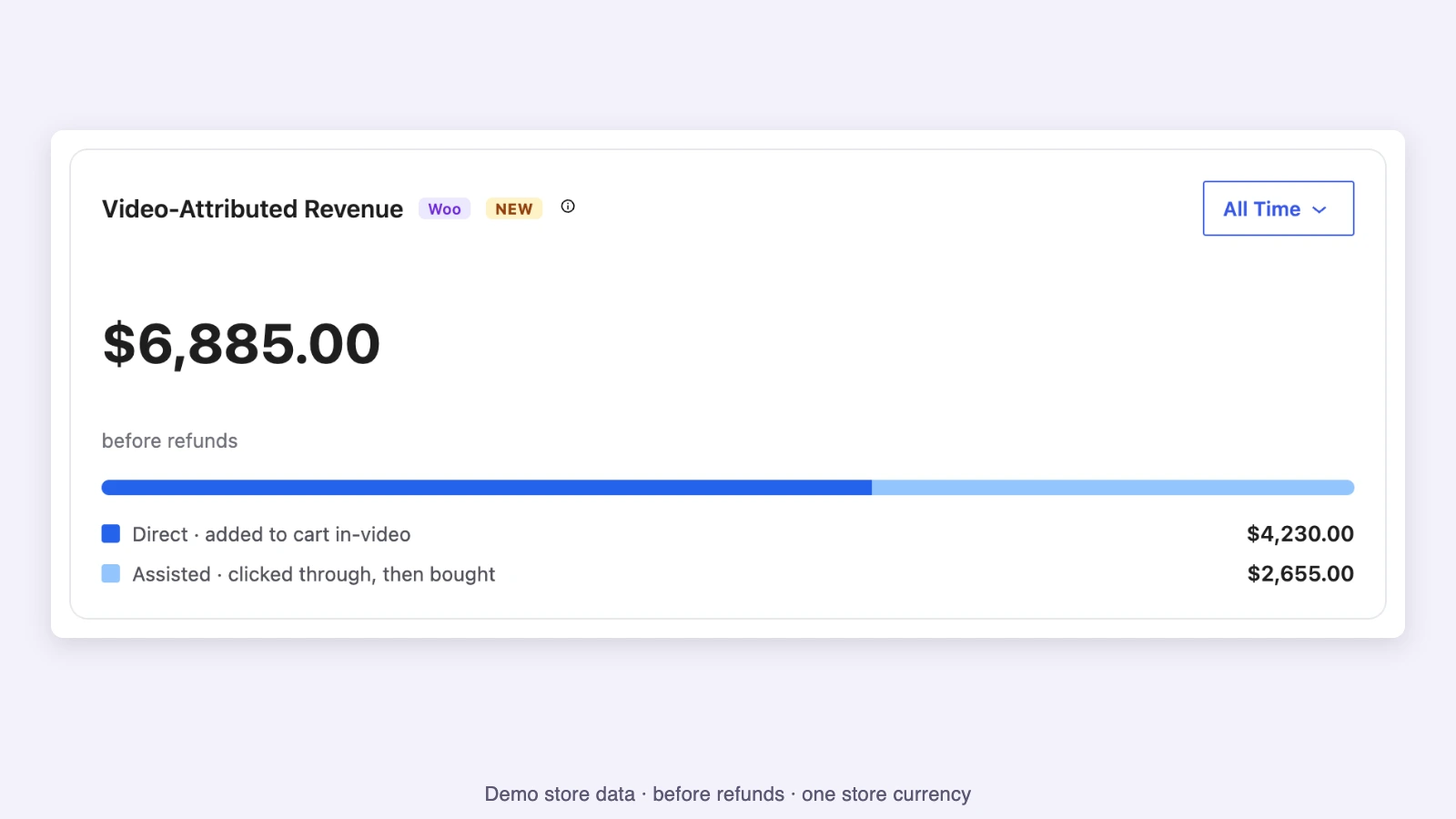
The new Video-Attributed Revenue card appears on GoDAM > Dashboard across your videos and on each video’s Analytics page. It splits credited order value into Direct, from an add-to-cart inside a video, and Assisted, from a click-through followed by an add on the product page.
On the Dashboard, Influenced sits in its own box: sales where the shopper started a video on the product page and added the product there, with no in-video add or click-through. It is never added to the headline. Open a video’s Analytics page for its Direct and Assisted figures; Top Videos does not have a revenue column.
Find the products shoppers open from your videos
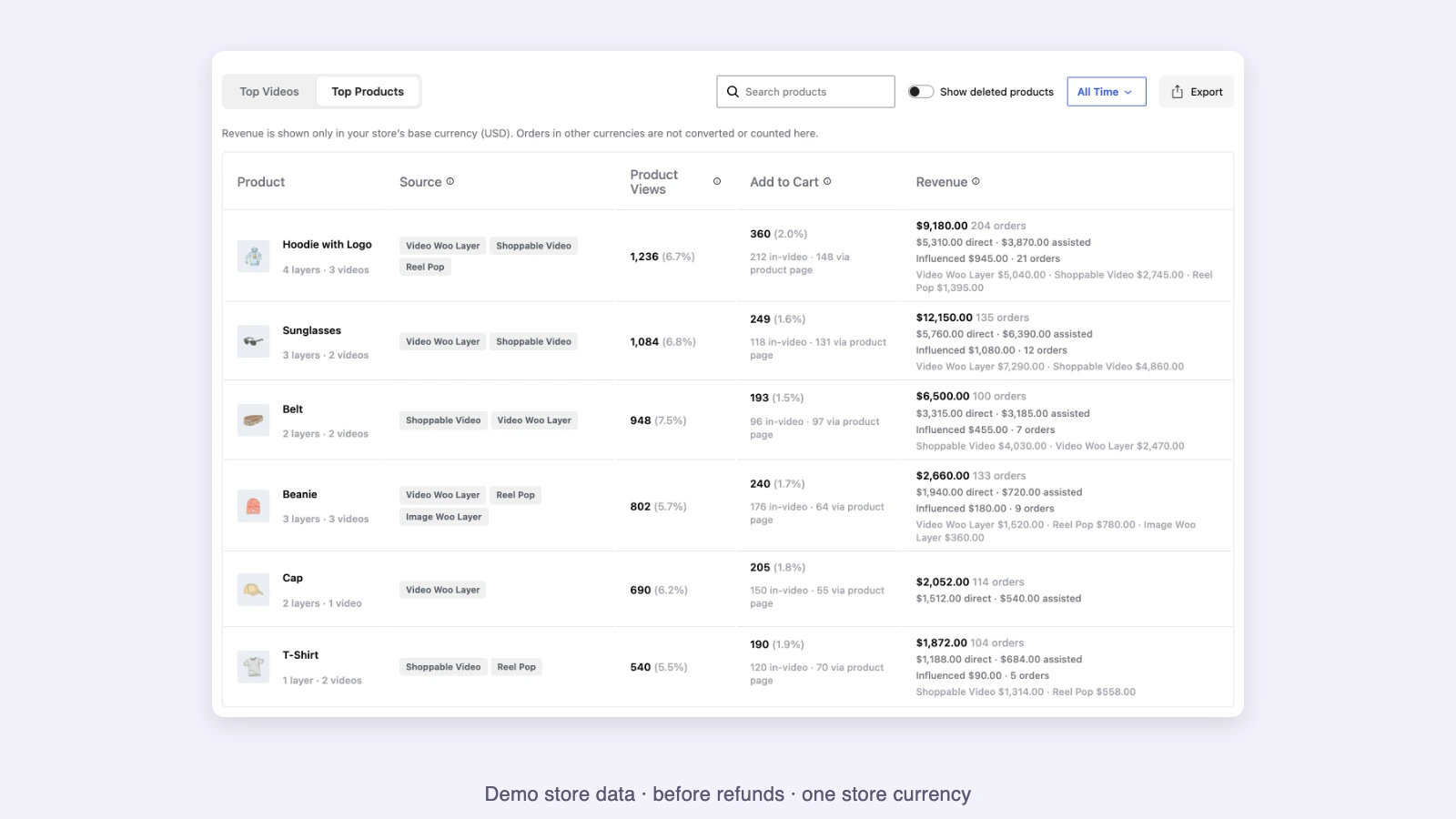
Top Products is a new tab beside Top Videos. Each product row shows Product Views, in-video and product-page adds, Direct and Assisted revenue, and source labels showing where the product appeared. You can search the table and export it to CSV.
The table is ranked by Product Views, counting sessions where someone opened a product from a video. Revenue sits beside that ranking. If a product gets opened often but rarely added to cart, you can review how it appears in your video.
See where the shopping journey stops
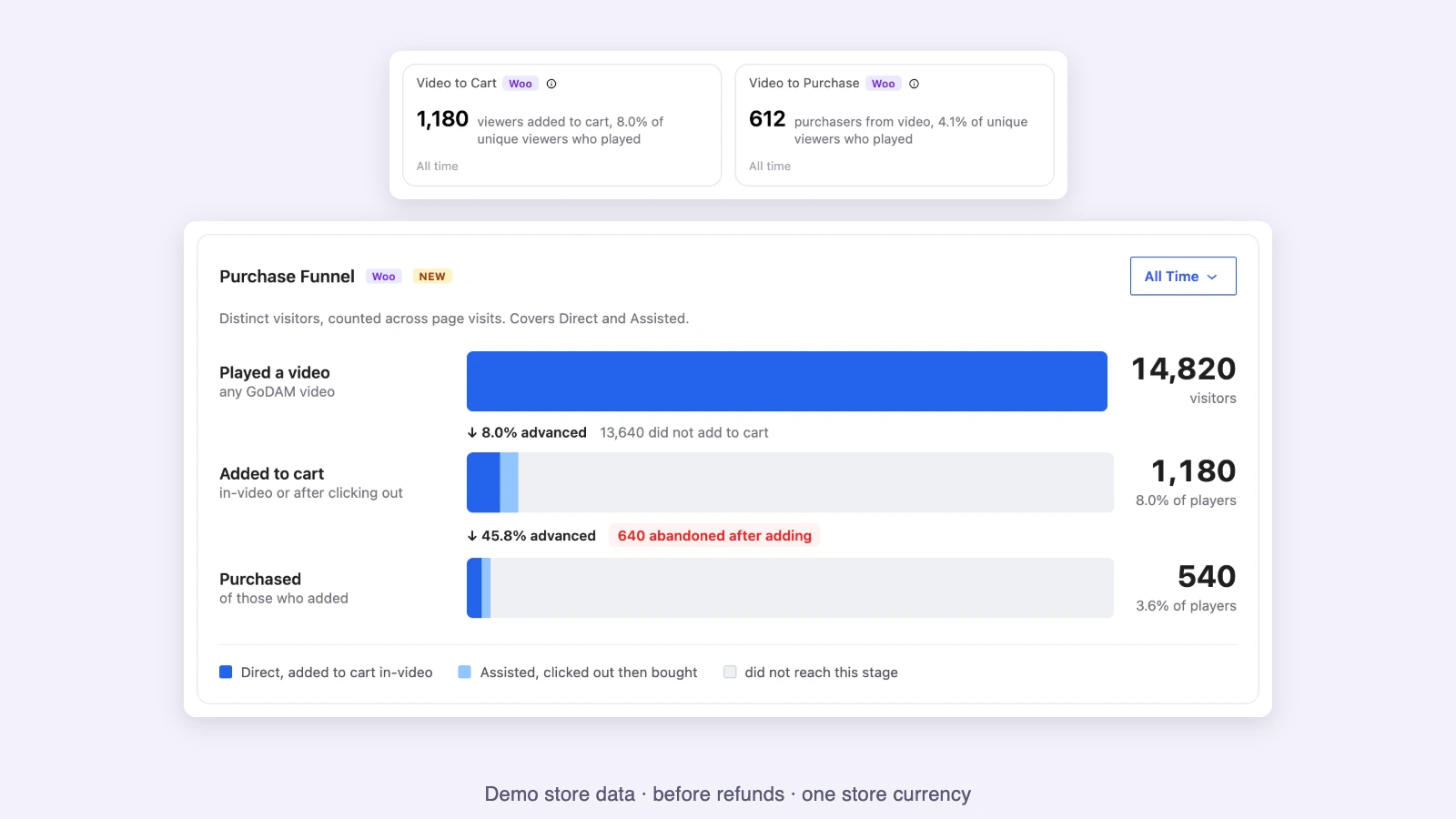
Video to Cart and Video to Purchase count people who played a video and then added a product or bought an attributed product. Each person counts once. The rates use unique viewers who played, and appear on the Dashboard and each video’s Analytics page.
The Purchase Funnel follows viewers through Played a video, Added to cart and Purchased, including how many abandoned after adding. On the Dashboard, Funnel by placement shows the journey for the Shoppable Video block, Woo product hotspots and Reel Pop.
How GoDAM credits an order
An in-video add receives Direct credit if the order is created within seven days. Assisted requires a product click from a video, an add on that product’s page, and an order within 30 days. An in-video add ordered after seven days can also become Assisted through day 30. A play alone does not enter the headline.
GoDAM credits only the attributed units of an order line, after discounts and excluding tax, shipping and fees. Eligible orders count once they reach processing or completed. The figure is before refunds; later refunds and cancellations are not subtracted. Orders in another currency are excluded rather than converted.
Revenue starts with eligible adds made after both updates, with no backfill. Analytics updates through the day; new activity can take up to about 30 minutes to appear. The Revenue Analytics guide covers the full rules and limits.
Send video commerce events through your GA4 setup
GoDAM for Woo can put standard add_to_cart and purchase events for video-attributed activity into your site’s data layer, with a video ID. This is off by default. Turn on Enable GTM Tracking in GoDAM > Settings > General Settings and click Save, then configure your own Google Tag Manager and GA4 setup to receive the events and show the video fields in reports.
When Google Analytics for WooCommerce or GTM4WP is active, GoDAM stands down to avoid duplicate events.
A few more things worth knowing
Conversion is now Interaction rate
The layer metric formerly called Conversion is now Interaction rate; Reel Pop analytics uses Interaction. The new labels describe clicks and other interactions without confusing them with purchases. This change applies beyond WooCommerce stores.
Inspect a hotspot and choose each card’s date range
On a video’s Analytics page, the Video Layer Timeline shows the revenue from in-video add-to-carts made through each Woo product hotspot. Video-Attributed Revenue, both purchase funnels, Top Products and Top Videos each have a date picker.
What changes in GoDAM for Woo 2.2?
The companion add-on records the order and product activity behind these reports. It adds per-product impressions and clicks for the Shoppable Video block, optional GA4 commerce events, and declared compatibility with WooCommerce High-Performance Order Storage (HPOS).
GoDAM for Woo 2.2 requires WordPress 6.9 or later, an active GoDAM API key, and GoDAM 2.3.0 or later. WooCommerce 8.8 or later is needed for Direct credit from in-video adds.
New to the add-on? Once WooCommerce and your GoDAM API key are active, go to GoDAM > Settings > Integrations Settings > WooCommerce and click Install GoDAM for Woo. Already using it? Update GoDAM to 2.3.0 first, then GoDAM for Woo to 2.2.0; updating the add-on before GoDAM prevents its shoppable blocks, hotspots and reels from loading until GoDAM is updated. Revenue Analytics is included in every GoDAM plan.
Start counting with GoDAM 2.3
Revenue Analytics is included in every GoDAM plan when the GoDAM for Woo add-on and an active API key are in place. The revenue figures build from eligible adds after both updates.
Update GoDAM to 2.3.0 first, then update GoDAM for Woo to 2.2.0 from your Plugins screen. If you have questions, write to team@godam.io. We read every email!
Links : GoDAM on WordPress.org | Full changelog | GoDAM documentation