Layers are what appear on top of a GoDAM video or image: a call to action, a form, a poll, a hotspot, an ad. From GoDAM 2.9.0, you can build your own layer types with the Layer API, the same way you build blocks for the WordPress block editor.
Your layer type gets everything GoDAM’s own layers get:
- an entry in the Add layer menu of the GoDAM media editor;
- a settings panel and a coloured marker on the video timeline;
- saving, with its data cleaned against the attributes you declare;
- rendering in the GoDAM player and on GoDAM Image blocks;
- a front-end script that loads only on pages that show your layer.
GoDAM’s own CTA, Form, Poll, Hotspot and Ad layers are built on this same API.
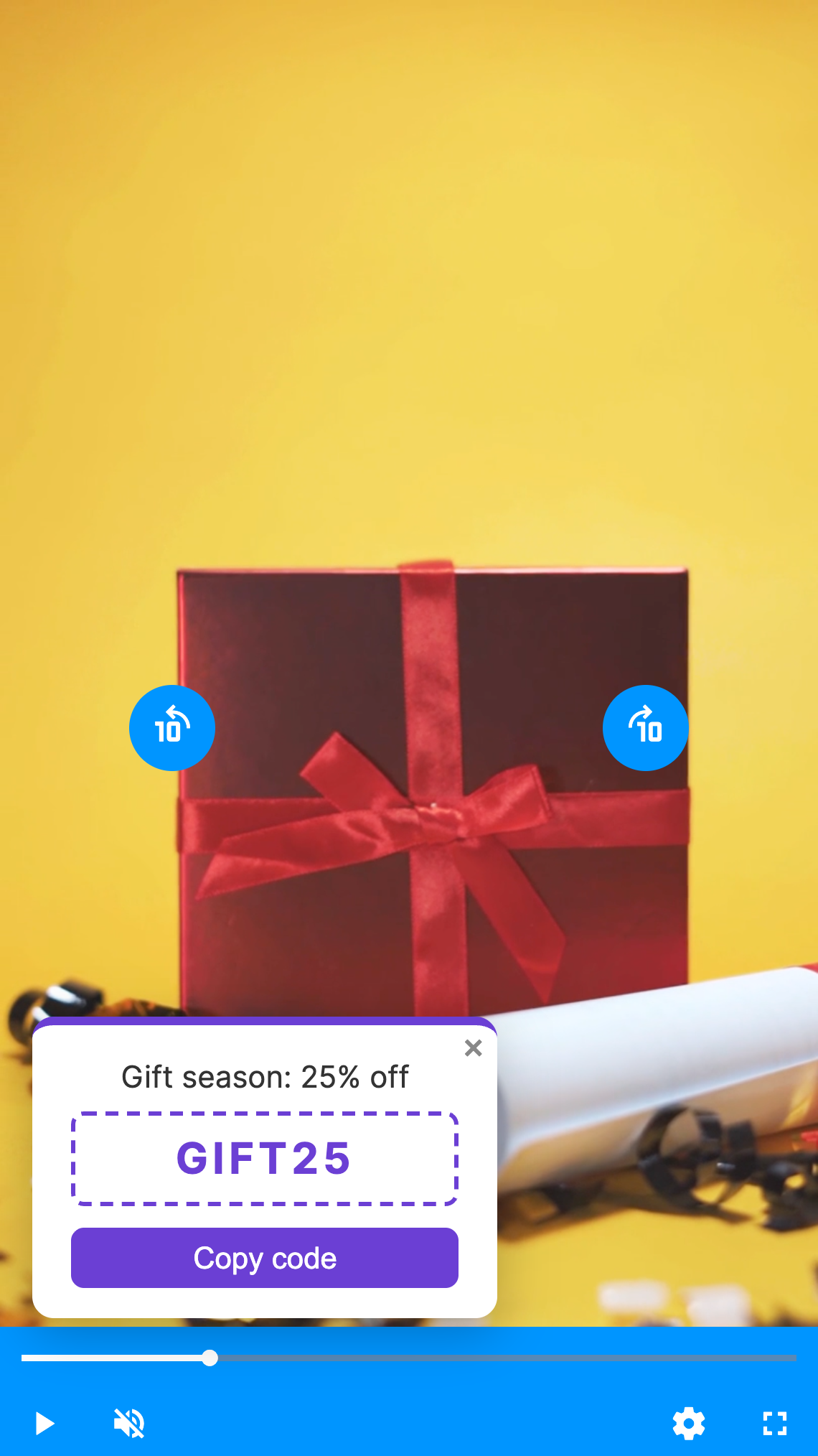
In this guide we build a Coupon layer: a discount code that appears at a chosen moment in a video, or straight away on an image, with a Copy code button.
What you need
- GoDAM 2.9.0 or later.
- Node.js and
@wordpress/scripts, to build the two scripts. - Some familiarity with WordPress plugins and React. If you’ve built a block, you’ll recognise most of this.
How a layer type fits together
A layer type is one metadata file plus up to three parts. Each part registers under the same name, here acme/coupon.
| Part | Runs in | Registers with | Does |
|---|---|---|---|
layer.json | everywhere | read by the PHP call | The name, title, icon, colour, media support, attributes and scripts |
| PHP | the server | godam_register_layer_type() | Prints the layer in the video player |
| Editor script | the GoDAM media editor | window.godam.layers.registerLayerType() | The settings panel |
| View script | the page | window.godam.layers.registerLayerRuntime() | Shows and hides the layer, and makes it interactive |
The finished plugin:
acme-coupon-layer/
├── acme-coupon-layer.php   registers the type and prints it in the player
├── layer.json              metadata
├── style.css               styles for the page and the editor
├── package.json
├── src/
│   ├── editor.js           the settings panel
│   └── view.js             the front-end behaviour
└── build/                  written by `npm run build`
Step 1: Describe the layer in layer.json
{
	"apiVersion": 1,
	"name": "acme/coupon",
	"title": "Coupon",
	"description": "Show a discount code viewers can copy",
	"icon": "tickets-alt",
	"color": "#e24a4a",
	"supports": {
		"media": [ "video", "image" ]
	},
	"attributes": {
		"heading": { "type": "string", "default": "Limited-time offer" },
		"code": { "type": "string", "default": "SAVE20" },
		"accent": { "type": "string", "format": "color", "default": "#e24a4a" },
		"duration": { "default": 8 }
	},
	"editorScript": "file:./build/editor.js",
	"viewScript": "file:./build/view.js",
	"style": "file:./style.css",
	"textdomain": "acme-coupon-layer"
}namemust be namespaced (vendor/name, lowercase letters, digits and dashes). It’s saved in every layer’stype, so pick it once and keep it.title,description,icon(a Dashicon name or an image URL) andcolorare how the type looks in the Add layer menu, the layer list and the timeline.supports.mediasays where the layer works. Our coupon works on both videos and images. Leave outimageand the type won’t be offered for images.attributesare the layer’s settings. They’re saved flat on the layer, next to GoDAM’s own keys.format: "color"makes GoDAM accept only a plain colour value when the layer is saved. Here we also change the default ofduration, a key GoDAM shares across layer types.editorScriptandviewScriptpoint to the built scripts.styleloads on the page *and* in the media editor, so the editor preview and the real layer share one stylesheet.textdomainlets GoDAM translate the title and description.
Step 2: Register the type in PHP
<?php
/**
* Plugin Name: Acme Coupon Layer
* Description: A GoDAM layer that shows a discount code over a video or image.
* Version: 1.0.0
* Requires Plugins: godam
* Text Domain: acme-coupon-layer
*
* @package AcmeCouponLayer
*/
defined( 'ABSPATH' ) || exit;
add_action( 'godam_init', 'acme_coupon_register_layer' );
/**
* Register the Coupon layer type from layer.json.
*
* @return void
*/
function acme_coupon_register_layer() {
godam_register_layer_type(
__DIR__ . '/layer.json',
array(
'render_callback' => 'acme_coupon_render_layer',
)
);
}
/**
* Print a Coupon layer in the video player.
*
* @param array $layer The saved layer: GoDAM's keys plus the attributes from layer.json.
* @param string $instance_id The player instance.
* @return string The layer container, or '' to print nothing.
*/
function acme_coupon_render_layer( $layer, $instance_id ) {
if ( empty( $layer['code'] ) ) {
return '';
}
// The player finds the layer by this id and shows it by removing `hidden`.
return sprintf(
'<div id="%1$s" class="easydam-layer hidden acme-coupon" style="--acme-coupon-accent: %2$s">%3$s</div>',
esc_attr( 'layer-' . $instance_id . '-' . $layer['id'] ),
esc_attr( $layer['accent'] ?? '#e24a4a' ),
acme_coupon_card_html( $layer )
);
}
/**
* The coupon card inside the container.
*
* @param array $layer The saved layer.
* @return string Card markup.
*/
function acme_coupon_card_html( $layer ) {
return sprintf(
'<div class="acme-coupon__card">
<button type="button" class="acme-coupon__close" aria-label="%1$s">×</button>
<p class="acme-coupon__heading">%2$s</p>
<p class="acme-coupon__code">%3$s</p>
<button type="button" class="acme-coupon__copy">%4$s</button>
</div>',
esc_attr__( 'Close', 'acme-coupon-layer' ),
esc_html( $layer['heading'] ?? '' ),
esc_html( $layer['code'] ),
esc_html__( 'Copy code', 'acme-coupon-layer' )
);
}Register on the godam_init action. It fires on init, so the type exists before anything renders, saves or loads the editor. godam_register_layer_type() reads layer.json, and the second argument adds what only PHP can provide.
render_callback prints the layer in the video player. It must return a container with this id and these two classes:
<div id="layer-{instance_id}-{layer id}" class="easydam-layer hidden …">…</div>The player finds your layer by that id and shows it by removing hidden. Everything inside the container is yours. Return '' to print nothing, as we do when a coupon has no code.
The output goes through wp_kses_post(). If your layer prints forms, inputs or scripts, set "supports": { "rawHtml": true } and escape everything yourself.
Step 3: Build the settings panel
/**
 * The Coupon layer in the GoDAM video editor: its settings panel and a preview on the video.
 */
import { __ } from '@wordpress/i18n';

const { registerLayerType } = window.godam.layers;
const { useLayerAttributes, useMediaType, LayersHeader, LayerCanvas, VeSection, VeTextInput, ColorPickerButton } = window.godam.layerEditor;

function CouponPanel( { layerID, goBack, duration } ) {
	const [ layer, setAttributes ] = useLayerAttributes( layerID );
	const mediaType = useMediaType(); // 'video' or 'image'
	if ( ! layer ) {
		return null;
	}

	return (
		<>
			<LayersHeader layer={ layer } goBack={ goBack } duration={ duration } layerName={ __( 'Coupon', 'acme-coupon-layer' ) } />

			<VeSection title={ __( 'Coupon', 'acme-coupon-layer' ) }>
				<VeTextInput
					label={ __( 'Heading', 'acme-coupon-layer' ) }
					value={ layer.heading }
					onChange={ ( heading ) => setAttributes( { heading } ) }
				/>
				<VeTextInput
					label={ __( 'Coupon code', 'acme-coupon-layer' ) }
					value={ layer.code }
					error={ layer.code ? '' : __( 'Enter a code.', 'acme-coupon-layer' ) }
					onChange={ ( code ) => setAttributes( { code: code.toUpperCase() } ) }
				/>
				{ /* An image has no timeline, so the coupon shows for as long as the image does. */ }
				{ mediaType === 'video' && (
					<VeTextInput
						label={ __( 'Show for (seconds)', 'acme-coupon-layer' ) }
						type="number"
						min={ 1 }
						value={ layer.duration }
						onChange={ ( value ) => setAttributes( { duration: Number( value ) || 1 } ) }
					/>
				) }
				<ColorPickerButton
					label={ __( 'Accent colour', 'acme-coupon-layer' ) }
					value={ layer.accent }
					enableAlpha={ false }
					onChange={ ( accent ) => setAttributes( { accent } ) }
				/>
			</VeSection>

			{ /* A live preview on top of the video, styled by the same style.css as the page. */ }
			<LayerCanvas>
				<div className="easydam-layer acme-coupon" style={ { '--acme-coupon-accent': layer.accent } }>
					<div className="acme-coupon__card">
						<p className="acme-coupon__heading">{ layer.heading }</p>
						<p className="acme-coupon__code">{ layer.code }</p>
						<button type="button" className="acme-coupon__copy">{ __( 'Copy code', 'acme-coupon-layer' ) }</button>
					</div>
				</div>
			</LayerCanvas>
		</>
	);
}

// The name, title, icon, colour, supports and attributes come from layer.json,
// which GoDAM hands to the editor from PHP. Add what only JavaScript can provide.
registerLayerType( 'acme/coupon', {
	edit: CouponPanel,
	// Block saving while a coupon has no code.
	validate: ( layer ) => !! layer.code,
} );
registerLayerType() only needs the name and an edit component. GoDAM passes your layer.json metadata from PHP, so you don’t repeat the title, icon, colour or attributes.
Everything the panel needs is on window.godam.layerEditor:
useLayerAttributes( layerID )returns the layer and asetAttributes()function, like a block’sattributesandsetAttributes.useMediaType()returns'video'or'image'. We use it to hide the “Show for” field on images, which have no timeline.LayersHeader,VeSection,VeTextInputandColorPickerButtonare the controls GoDAM’s own panels use, so your panel looks native.LayerCanvasdraws its children on top of the video, for a live preview while you edit.
validate blocks saving while a coupon has no code. The editor tells the user which layer needs fixing.
Use these hooks and components rather than reading the editor’s Redux store: the store’s shape isn’t part of the API.
Step 4: Make it work on the page
/**
 * The Coupon layer on the page: shows it at its time on a video, or at once on an image.
 */
import { __ } from '@wordpress/i18n';

const { registerLayerRuntime } = window.godam.layers;

registerLayerRuntime( 'acme/coupon', {
	title: 'Coupon',
	supports: { media: [ 'video', 'image' ] },

	// Skip a layer saved without a code.
	validate: ( layer ) => !! layer.code,

	mount( { layer, container, media, api } ) {
		// On a video, the container holds what render_callback printed.
		// On an image, it's an empty wrapper, so draw the card here.
		if ( ! container.querySelector( '.acme-coupon__card' ) ) {
			container.classList.add( 'acme-coupon' );
			container.style.setProperty( '--acme-coupon-accent', layer.accent || '#e24a4a' );
			container.innerHTML = `
				<div class="acme-coupon__card">
					<button type="button" class="acme-coupon__close"></button>
					<p class="acme-coupon__heading"></p>
					<p class="acme-coupon__code"></p>
					<button type="button" class="acme-coupon__copy"></button>
				</div>`;
			container.querySelector( '.acme-coupon__close' ).textContent = '×';
			container.querySelector( '.acme-coupon__close' ).setAttribute( 'aria-label', __( 'Close', 'acme-coupon-layer' ) );
			container.querySelector( '.acme-coupon__heading' ).textContent = layer.heading || '';
			container.querySelector( '.acme-coupon__code' ).textContent = layer.code;
			container.querySelector( '.acme-coupon__copy' ).textContent = __( 'Copy code', 'acme-coupon-layer' );
		}

		let closed = false;
		const copyButton = container.querySelector( '.acme-coupon__copy' );

		copyButton.addEventListener( 'click', async () => {
			try {
				await window.navigator.clipboard.writeText( layer.code );
				copyButton.textContent = __( 'Copied!', 'acme-coupon-layer' );
			} catch {
				copyButton.textContent = layer.code;
			}
			api.track( 'copied' );
		} );

		container.querySelector( '.acme-coupon__close' ).addEventListener( 'click', () => {
			closed = true;
			api.hide();
		} );

		// An image has no timeline: show the coupon straight away.
		if ( media.type === 'image' ) {
			api.show();
			return;
		}

		const start = Number( layer.displayTime ) || 0;
		const end = start + ( Number( layer.duration ) || 8 );

		return {
			onTimeUpdate( currentTime ) {
				if ( ! closed && currentTime >= start && currentTime < end ) {
					api.show();
				} else {
					api.hide();
				}
			},
			// Show it again on a replay, even if the viewer closed it.
			onReplay() {
				closed = false;
			},
		};
	},
} );
registerLayerRuntime() is plain JavaScript with no React, so it stays light on the front end. GoDAM calls mount() once for every saved Coupon layer on the page, with:
layer | The saved layer: GoDAM’s keys (id, displayTime, duration…) plus your attributes. |
container | The layer’s element. On a video, it holds what render_callback printed. On an image, it’s an empty wrapper, so your script draws the markup. |
media | { type: 'video' | 'image', element }. |
api | show(), hide(), pause(), play(), seek(), currentTime(), track() and more. |
mount() returns the handlers it needs. Every handler is optional:
onTimeUpdate( currentTime )onPlay(),onPause()andonEnded()onReplay()onResize()andonFullscreenChange()onReady()destroy()
The coupon uses onTimeUpdate to show itself between displayTime and displayTime + duration.
Analytics: api.track() doesn’t record anything for third-party layer types yet. GoDAM’s analytics service accepts only GoDAM’s own types today, and support for namespaced types is planned. Calling it now is harmless and means your layer reports once that support arrives.
Step 5: Style it
/* Loads on the page and in the video editor (the `style` key in layer.json). */

/* Override the default full-size white overlay: the coupon sits in a corner. */
.easydam-layer.acme-coupon {
	align-items: flex-end;
	justify-content: flex-start;
	/* Keep clear of the player's control bar. */
	padding: 4% 4% 64px;
	box-sizing: border-box;
	background: transparent;
	pointer-events: none;
}

.acme-coupon__card {
	position: relative;
	pointer-events: auto;
	min-width: 180px;
	padding: 14px 18px;
	border-radius: 10px;
	border-top: 4px solid var(--acme-coupon-accent, #e24a4a);
	background: #fff;
	box-shadow: 0 6px 24px rgba(0, 0, 0, 0.25);
	font-family: inherit;
	line-height: 1.4;
	text-align: center;
}

/*
 * On an image, the layer's container is a `display: contents` wrapper inside
 * GoDAM's image overlay, so place the card in the corner yourself.
 */
.godam-image-layer-item.acme-coupon .acme-coupon__card {
	position: absolute;
	bottom: 6%;
	left: 4%;
}

.acme-coupon__heading {
	margin: 0 0 6px;
	font-size: 14px;
	color: #333;
}

.acme-coupon__code {
	margin: 0 0 10px;
	padding: 6px 10px;
	border: 2px dashed var(--acme-coupon-accent, #e24a4a);
	border-radius: 6px;
	font-size: 20px;
	font-weight: 700;
	letter-spacing: 2px;
	color: var(--acme-coupon-accent, #e24a4a);
}

.acme-coupon__copy {
	width: 100%;
	padding: 6px 12px;
	border: 0;
	border-radius: 6px;
	background: var(--acme-coupon-accent, #e24a4a);
	color: #fff;
	font-size: 14px;
	cursor: pointer;
}

.acme-coupon__close {
	position: absolute;
	top: 2px;
	right: 6px;
	padding: 0;
	border: 0;
	background: none;
	font-size: 18px;
	line-height: 1;
	color: #888;
	cursor: pointer;
}
GoDAM’s layer container covers the whole video with a white overlay by default. The .easydam-layer.acme-coupon rule turns that off, so the coupon sits in a corner and the video stays visible and clickable.
On an image, the container is a display: contents wrapper with the class godam-image-layer-item, inside GoDAM’s image overlay. That’s why the card is positioned absolutely there.
Step 6: Build and activate
{
	"name": "acme-coupon-layer",
	"version": "1.0.0",
	"private": true,
	"scripts": {
		"build": "wp-scripts build src/editor.js src/view.js",
		"start": "wp-scripts start src/editor.js src/view.js"
	},
	"devDependencies": {
		"@wordpress/scripts": "^30"
	}
}
npm install
npm run buildwp-scripts writes build/editor.js and build/view.js, plus an *.asset.php file beside each that lists its dependencies. GoDAM reads those files and adds its own dependencies, so window.godam.layers and window.godam.layerEditor are always ready when your scripts run.
Activate Acme Coupon Layer in Plugins.
Try it
On a video
Open a video in the GoDAM media editor, pick a spot on the timeline and click Add layer. Coupon is in the menu, with the description from layer.json:
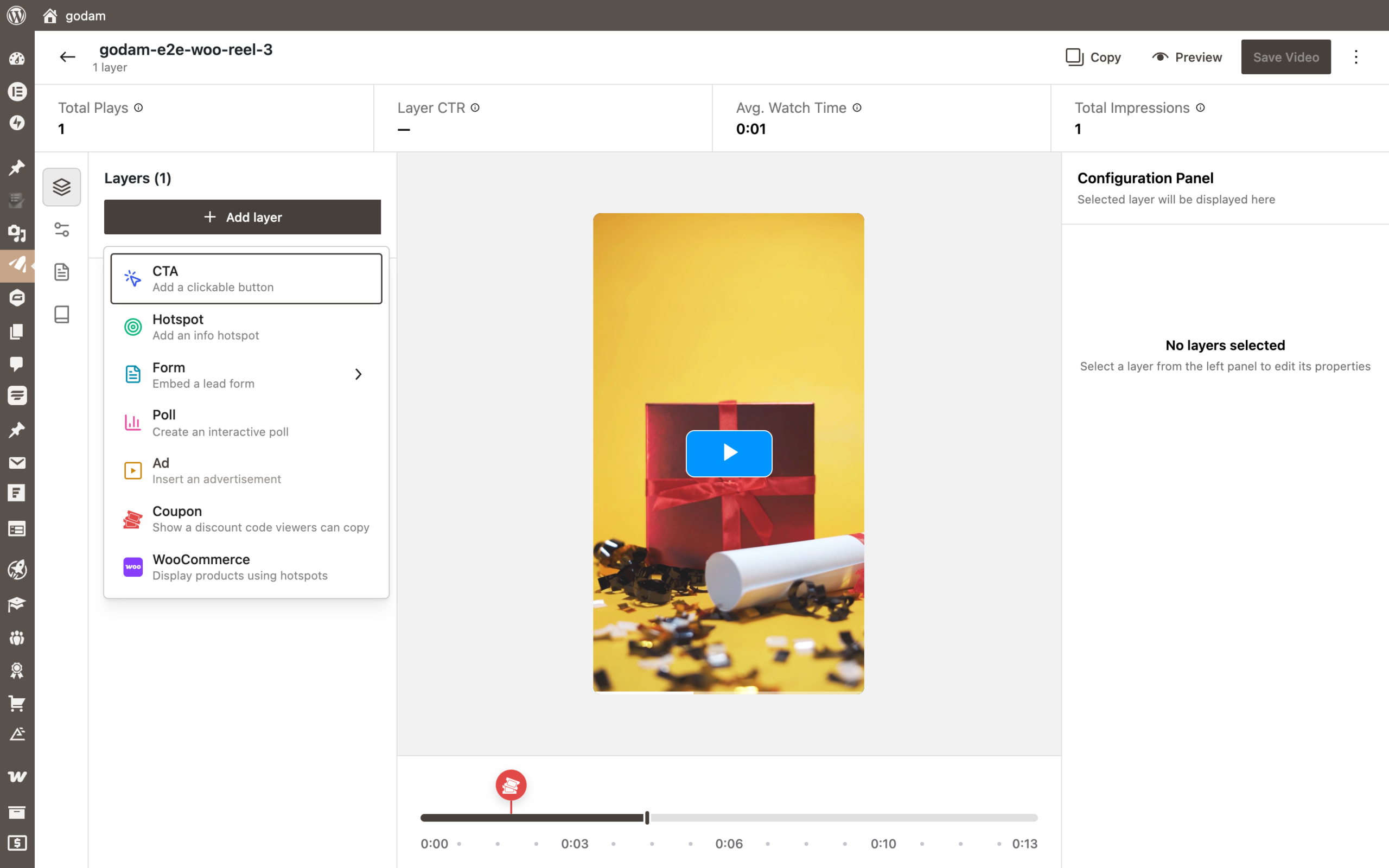
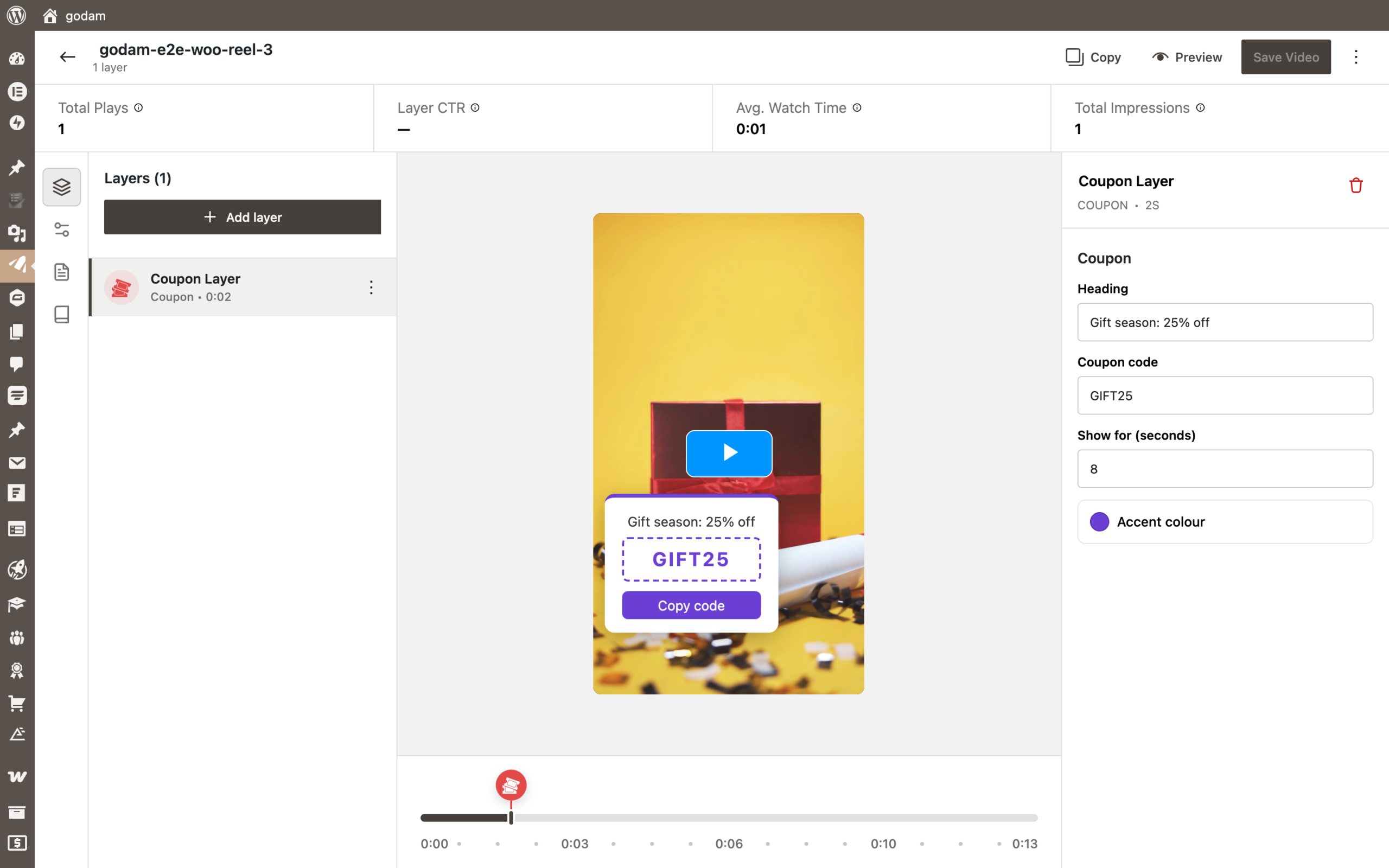
Choose it. Your panel opens on the right, the preview appears on the video, and a marker in the type’s colour shows its time on the timeline. Change the heading, code or colour and the preview updates as you type. Click Save Video.
On the page, the coupon appears at its time, stays for the number of seconds you set, then hides. Copy code copies the code to the clipboard.
On an image
Open an image in the GoDAM media editor. The Add layer menu lists only the types whose supports.media includes image, and Coupon is one of them. The “Show for” field is hidden, because useMediaType() returns 'image'.
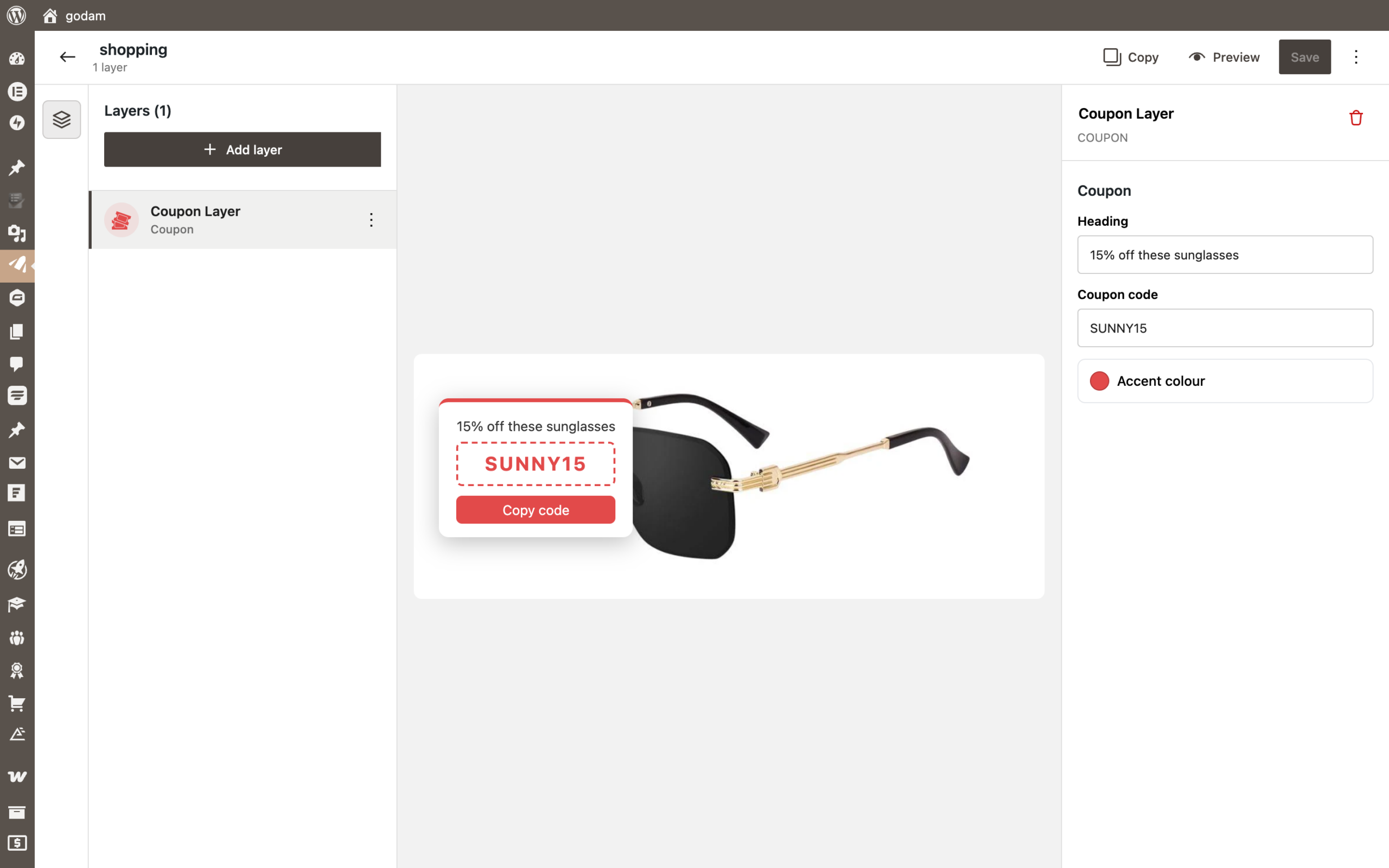
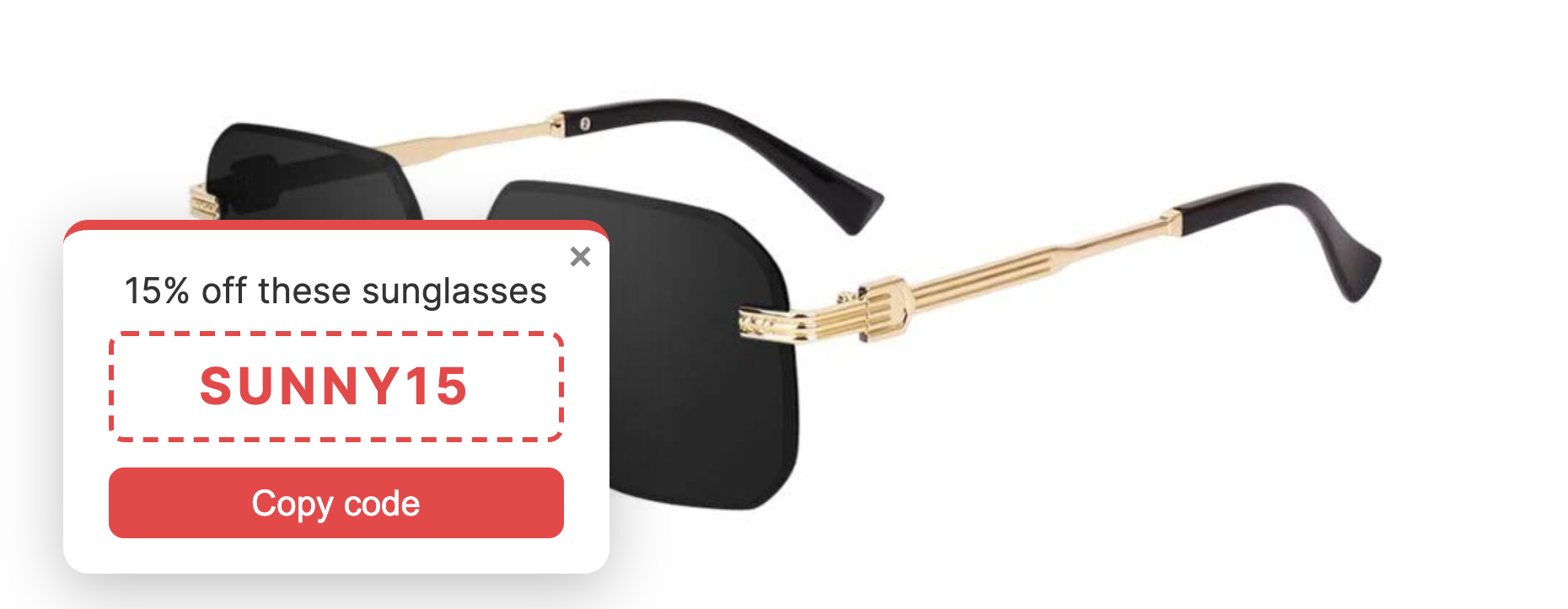
Add the image to a post with the GoDAM Image block, and the coupon shows on it straight away:
What GoDAM handles for you
Saving. Layers are saved on the attachment, in rtgodam_meta.layers, as flat objects:
{
  "id": "305e3e44-dcc5-4d8b-9510-7bd93e66d258",
  "type": "acme/coupon",
  "name": "Coupon Layer",
  "displayTime": "2",
  "duration": 8,
  "heading": "Gift season: 25% off",
  "code": "GIFT25",
  "accent": "#6b3fd4"
}- Cleaning on save. Each attribute is sanitised by its
format, and values of the wrong type fall back to the default. Keys you don’t declare inattributesare dropped, so declare everything you save. - Loading only where needed.
view.jsandstyle.cssload only on pages that show a Coupon layer. A page without one never loads them. - Late scripts. If an optimisation plugin delays
view.js, GoDAM keeps the layer and mounts it once the runtime registers. - Errors stay contained. If your
mount()or a handler throws, GoDAM logs the error and every other layer keeps working.
Troubleshooting
| You see | Check |
|---|---|
| The type isn’t in Add layer | The editor script didn’t load or registerLayerType() was rejected: look in the console for GoDAM: layer type names must be namespaced…. Or supports.media doesn’t include the media you opened. |
| The layer never appears on the page | render_callback returned '', the container id doesn’t match layer-{instance_id}-{id}, validate() returned false, or your handlers never call api.show(). |
GoDAM: no runtime registered for layer type "…" | view.js didn’t load or didn’t call registerLayerRuntime(). |
| A setting is gone after saving | It isn’t declared in layer.json attributes. |
| Markup is missing from the container | wp_kses_post() stripped it. Set supports.rawHtml and escape it yourself. |
Moving an add-on from the old hooks
If your add-on adds layers through godam_video_editor_layer_options, godam_video_editor_layer_components, godam_player_render_layer, window.godamLayerComponents or window.godamLayerRegistry, it keeps working in GoDAM 2.9.0, with deprecation notices. Those hooks are removed in GoDAM 2.11.0. The developer reference maps each old hook to its replacement.
Keep your type’s existing name when you move: renaming it would orphan the layers already saved with the old type.
Going further
The full reference covers more:
- Variations, which add a form plugin to the Form layer.
createandgetAvailabilityin the editor.is_availableandshould_renderin PHP.ctx.shared(), for one controller per player.- Translations, and the hooks for changing any type’s metadata.
Read it in the GoDAM plugin’s docs/layer-api.md.