
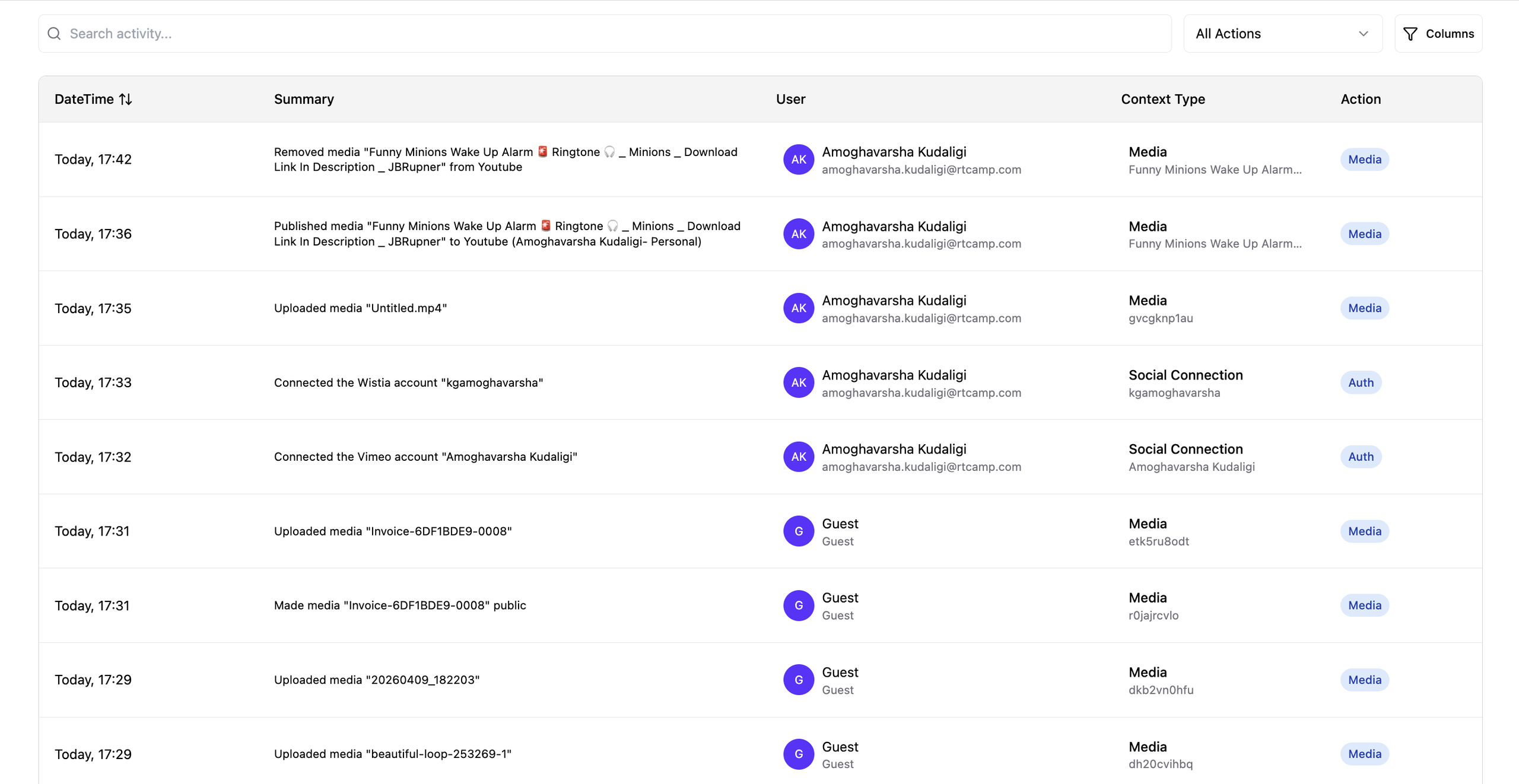
The Activity page is a record of what has happened in your organization. Every upload, deletion, membership change, and billing event is written to it automatically, so you can see who did what and when. There is nothing to set up and nothing to switch on the page is read-only, and your only actions on it are searching, filtering, and sorting.
1. Who Can See the Activity Page
- Only an organization Owner or Manager can open the Activity page.
- Members with the Viewer role do not see it.
- The page always shows the activity of the organization you currently have selected. If you belong to more than one organization, switch organizations to see the other feed.
- Routine system and maintenance entries are hidden, so the page shows the actions of real people rather than internal background work.
2. What Each Column Shows
- DateTime: when the action happened.
- Summary: a plain-language description of the action, for example Archived media Foo.mp4 or Invited [email protected] to Acme.
- User: the person who performed the action, with their name and email address.
- Context Type: what the entry is about, a media file, a playlist, an organization, a subscription and the specific item it refers to.
- Action: the category the entry belongs to, such as Media or Billing. Click it to filter the page down to that category.
Use the column filter to hide columns you do not need. DateTime always stays visible.
3. Searching, Filtering, and Sorting
- Search matches the summary text, the item name, and the person’s name so you can look up a filename, a teammate, or a phrase from an entry.
- All Actions filters the page to a single category. Choose All Actions again to clear it.
- Sort switches between newest first and oldest first.
- Entries are paginated, and you can change how many appear per page.
4. What Gets Recorded
Activity is grouped into categories. These are the same categories used by the Action filter.
- Media: uploads, moving media to Trash, permanent deletion and restore, renaming, visibility changes, archiving, folder moves, thumbnail changes, per-video player appearance, transcript edits, re-transcoding, the outcome of transcoding, version switches and deletions, exports, folder changes, and all playlist changes.
- Content: live streams created, started, ended, visibility changed, deleted, or reported and posts published from the GoDAM iOS app.
- Comment: comments and likes on videos and posts, including edits and removals.
- Membership: invitations sent and re-sent, invitations accepted, members removed, members leaving, and role changes.
- Organization: renaming the organization, transferring ownership, organization and video player settings, the default transcription language, the default member role, the organization logo, domain verification and removal, site whitelist changes, new WordPress sites connecting with your license key, connecting or disconnecting Vimeo, and access to the organization API key.
- Billing: subscription created, plan changed, cancellation scheduled, reactivated, cancelled, renewed, billing address updated, and wallet coin activity from the iOS app.
- Account: accounts created by end users in the GoDAM iOS app signup, activation, joining another organization, profile updates, deletion, and blocking.
- Auth: reserved for sign-in activity, which is not recorded at present. This category stays empty.
Entries come from wherever the action happened the GoDAM Central web app, the WordPress plugin, or the GoDAM iOS app. Some entries have no person behind them at all, such as transcoding finishing or a live stream ending. These are recorded against whoever owns the media or the stream.
5. When Entries Appear
- Entries are written in the background, so an action appears on the page shortly after you perform it rather than instantly.
- If you have just done something and do not see it yet, refresh the page after a short wait before assuming it was missed.
6. What Is Not Recorded
Some things are left out on purpose, to keep the page readable and focused on decisions people make.
- Automatic processing steps: image resizing, generating previews and derivatives, and the AI transcription and indexing jobs. Your own edit to a transcript is recorded.
- Video views and other playback analytics, which are reported separately.
- Sign-in, sign-out, and one-time password requests.
- Mobile app device registration, which happens every time the app is opened.
- Creating or deleting an organization. A brand new organization has no feed for the entry to appear in, and once an organization is deleted its feed no longer exists.
7. Good to Know
- Renaming your organization keeps your history. The full feed carries over to the new name, and a “Renamed organization” entry is added.
- Entries refer to items that may no longer exist. A deletion entry stays on the page after the file is gone, which is the point of a record.
- Sensitive values are never shown. API keys, passwords, tokens, and Custom CSS content are excluded from entry details. An entry will say that a setting changed, not what it was changed to, where the value is sensitive.
- Older entries are removed over time according to your site’s retention period, so the page shows recent activity rather than a permanent archive.
- Activities are retained for 90 days. Entries older than 90 days are removed automatically, so the Activity page shows recent activity rather than a permanent archive.